
Custom functions
Custom functions are caller-side tools the simulated caller can invoke during a test conversation. They let your tests cover situations where the caller needs to do something, not just talk — fetch the current date, look up an order number, get a confirmation code from your test fixtures, etc.
When you’d use one
Custom functions are useful when the caller’s persona is supposed to say or use a value that has to come from somewhere outside the scenario description. Examples:
- A caller who is supposed to confirm “today’s date” —
getDatereturns it from your fixture, the caller speaks it. - A caller who has a known order number that varies per test run —
lookupOrderreturns the order details, the caller answers verification questions from those details. - A caller who needs to embed a current value (e.g. weather, queue position, time) into their reply — function returns it, caller weaves it in.
If the caller can answer purely from the scenario description text, you don’t need a custom function. Most scenarios don’t.
Built-in tools (always available)
Every scenario has two built-in tools regardless of whether you add any customs:
| Tool | What it does |
|---|---|
end_call | Hangs up the call. Fired when the caller’s end conditions are met. |
press_digit | Sends DTMF — used for IVR menu navigation, digit-by-digit data entry. |
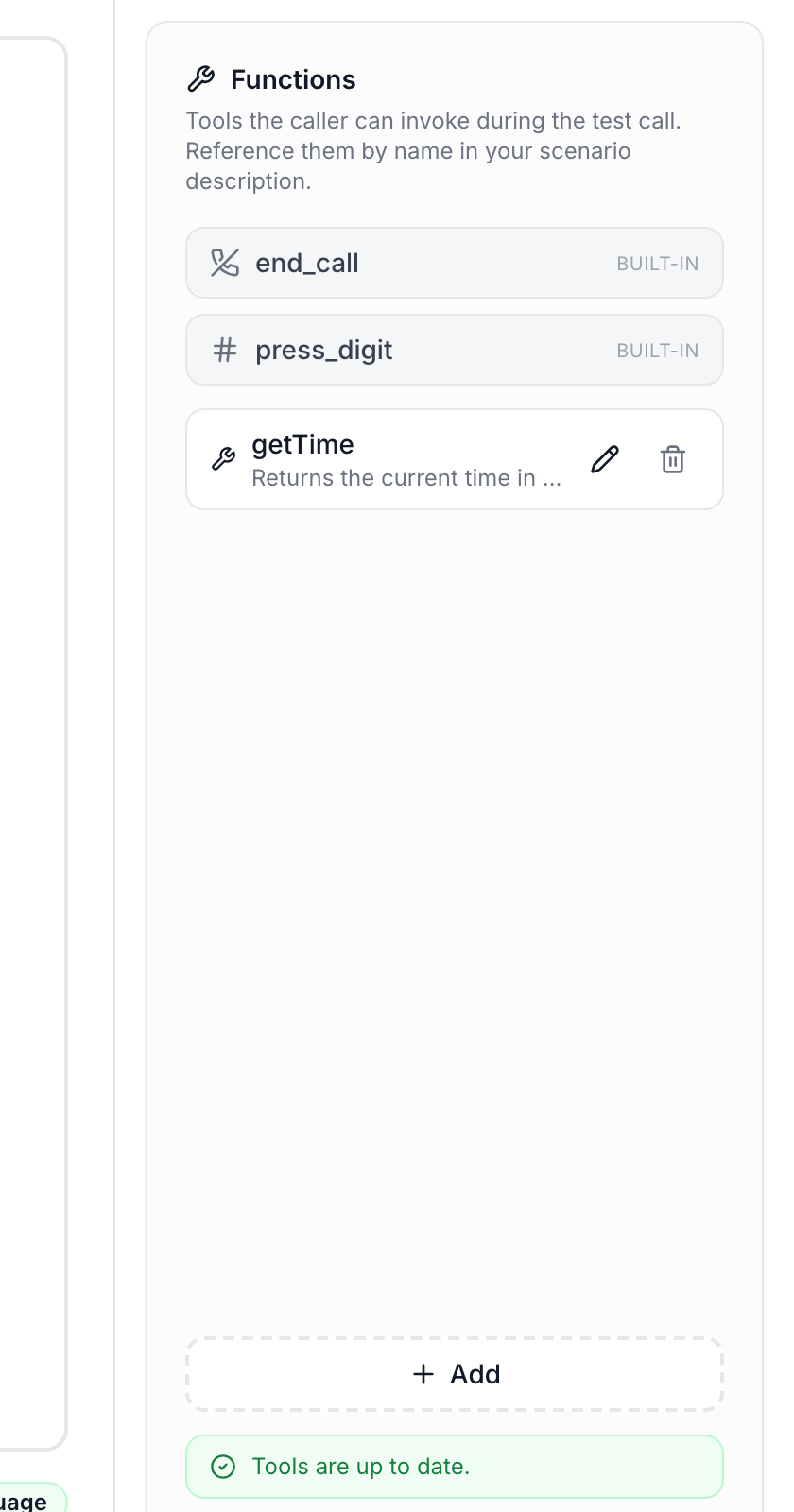
These show up as read-only badges in the Functions panel. You can’t edit, delete, or rename them.
Limitations and scope
- Free-flow scenarios only. The graph designer doesn’t surface custom functions today. (You can still add them; they just won’t be invoked from a graph run.)
- Per-scenario. A function lives on one scenario. If you want the same function across many scenarios, you’ll re-declare it. (A library / template feature is on the roadmap.)
- Caller-side only. Custom functions belong to the simulated caller. They are NOT how you mock your target agent’s downstream APIs.
Adding a custom function
Open a free-flow scenario and click + Add on the right-side Functions panel. The dialog has these fields:
Name
Required. The identifier the caller LLM uses when invoking. Letters, digits, _, -. Names end_call and press_digit are reserved.
Description
Required. A one-line summary of what the function does and when to call it. The caller LLM reads this to decide whether to invoke. Be concrete:
- Good:
getDate — returns today's date as ISO. Call when the agent asks for the date or the persona wants to mention it. - Less good:
helper
API endpoint (URL + method)
Required. Where AssureAgent’s backend will send the request. Must start with http:// or https://. Method is one of GET, POST, PUT, PATCH, DELETE.
Timeout
Default 120000 ms (2 minutes). Hard cap at 600000 ms (10 minutes). If your endpoint takes longer than this, the call hears silence and the caller has to recover — usually you want this faster than the call’s max duration.
Headers
Optional. Key-value pairs added to every request. Useful for Authorization, custom X- headers, etc.
Query parameters
Optional. Key-value pairs appended to the URL.
Parameters (JSON Schema)
Optional. Defines the shape of the JSON body the caller LLM is expected to produce when invoking. If omitted, the caller invokes with no body. Example:
{ "type": "object", "properties": { "orderId": { "type": "string", "description": "The order ID to look up" } }, "required": ["orderId"]}Store fields as variables (response variables) — IMPORTANT
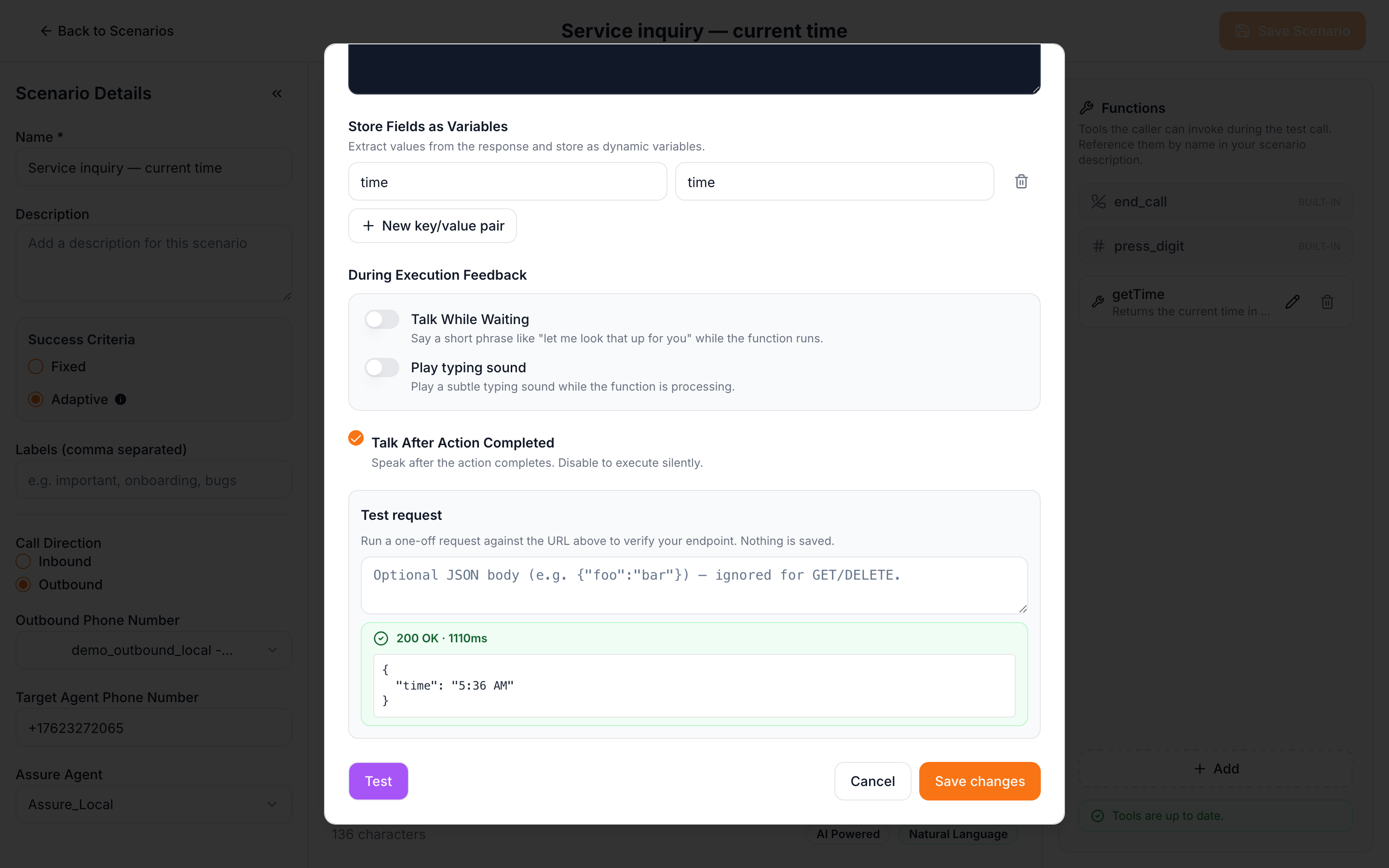
This is the canonical mechanism for using the function’s response in the caller’s reply. Each row maps a JSON path in the response to a variable name. Once mapped, you can reference the variable as {{name}} in your scenario description and it gets substituted at runtime.
Example: your getDate endpoint returns { "date": "2026-05-02" }. Add a response variable:
| Name | JSON path |
|---|---|
date | date |
Then in your scenario description, write things like:
Before every sentence, call
getDateand start withIt's {{date}}.
The caller will invoke the function on every turn and embed the actual date string in its spoken reply.
Talk while waiting / Talk after action
- Talk while waiting. If the function takes a noticeable moment, the caller speaks a brief filler (“Let me check…”) rather than going silent.
- Talk after action completed. Default ON. The caller produces a spoken reply after the result comes back. Disable for fire-and-forget actions where speech would feel unnatural.
Test button
Click Test to send a one-off request to your endpoint with the configured method, headers, query params, and your supplied sample JSON body. The result panel shows status code, duration, and the response body. Nothing is saved. Useful for verifying your endpoint is reachable and returns what you expect before you save the function.
Two usage patterns
This is the part that trips people up most. Pick the right one for your scenario; the platform’s persona generator detects the pattern from the verbs you use.
Lookup-and-speak-bare
The target agent asks the caller for a value. The caller invokes the function, gets the value, and speaks it bare (no sentence wrapping) so the target’s ASR doesn’t mis-parse it.
Trigger words: “when the agent asks for X, call function and provide it.”
Example description:
When the agent asks for your order number, call
lookupOrderNumberand answer with the bare number.
This pattern follows the Data Response Protocol — the caller says "033558273" not "my order number is 033558273".
Embellish-into-reply
The caller weaves the value into its own speech. The target hasn’t asked; the caller is just being natural.
Trigger words: “tell the X”, “say the X”, “use X in your reply”, “before / after every sentence”.
Example description:
Before every sentence you say, call
getTimeand start withIt's {{time}}.
The caller will embed the time inside its sentences:
It’s 9:02 AM. Hello, I’m calling about my account…
For this pattern to work reliably, add a response variable so the value can be referenced as {{time}}. Without the variable binding, the caller has the raw response in context but isn’t guaranteed to embed it consistently.
Referencing functions in your description
Two rules that matter:
- Use the function’s exact name in the description, e.g.
getTime. The persona generator wires it up by name. - Preserve cardinality cues. If you want the function called every turn, write “every turn” or “before every sentence” — not “use this when relevant”. The generator preserves wording like every, always, before each, once at start verbatim, so vague triggers stay vague and produce inconsistent calling.
Sync status banner
The Functions panel shows a small banner reflecting upstream sync state:
| State | Meaning |
|---|---|
| hidden | No functions on this scenario, or already synced. |
| Pending (blue, spinner) | Save in flight. |
| Synced (green, checkmark) | Functions are active on the next test run. |
| Error (red, with Retry) | We couldn’t update tools. Click Retry; the metadata is still saved locally — only the upstream registration failed. |
You can keep editing while the sync happens; the next save reflects all your changes.
Editing and deleting
- Edit any field — the changes save with the scenario; the next run reflects them. (Mid-flight runs keep their starting tool set.)
- Delete by clicking the trash icon. Built-ins can’t be deleted.
- Delete the last custom function on a scenario and the per-scenario specialized state is torn down automatically. The next run uses the base agent again.
Test recipe
Smallest end-to-end test:
- Stand up an HTTP endpoint (Cloud Run, ngrok-tunneled local Express, anywhere reachable from the internet) that returns
{ "time": "9:02 AM" }. - Add a function:
- Name:
getTime - URL: your endpoint
- Method:
GET - Response variables:
{ name: "time", jsonPath: "time" }
- Name:
- In the scenario description:
Before every sentence you say, call
getTimeand start withIt's {{time}}. - Save, generate test paths, run.
- In the report, you’ll see
getTimeinvocations inline in the transcript and the caller’s lines beginning with the time.
Import / export
Custom functions round-trip through scenario JSON export and import. The function definitions you authored come along; the upstream registration is recreated in the importing workspace’s account from scratch.